

Getting your Shopify store noticed on Google can be hard.
You may have great products, strong images, and competitive prices. But if your store is not easy for search engines to understand, it may struggle to reach the right shoppers.
This is where Shopify SEO apps can help.
The right SEO app can help you optimize product pages, fix technical SEO issues, improve images, add structured data, and find opportunities to increase organic traffic.
But you do not need dozens of apps.
Even the best SEO app cannot help if your pages are not designed to maximize conversions from organic traffic.
What Is the Best SEO App for Shopify?
There is no single Shopify SEO app that is perfect for every store.
Your best choice depends on your SEO goals.
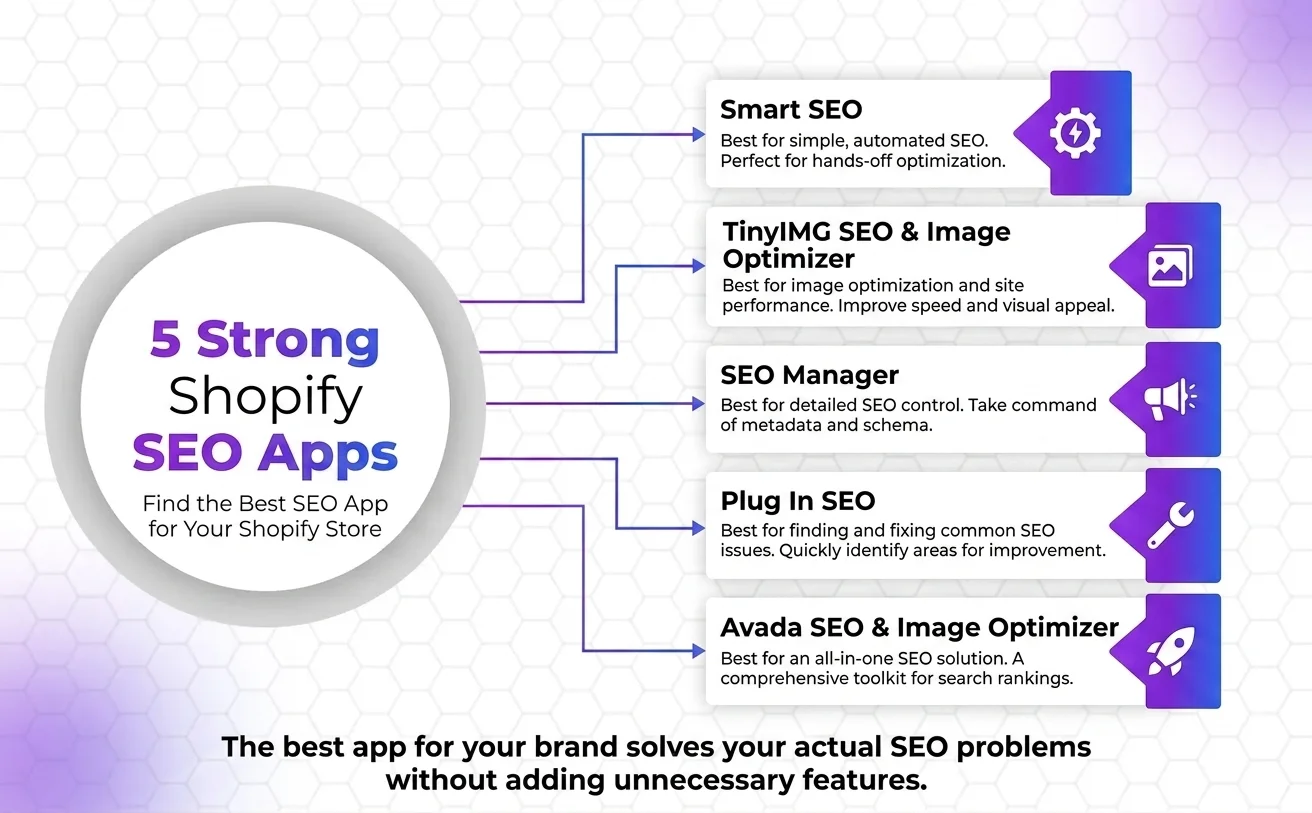
Here are five strong options to consider:
- Smart SEO – Best for simple, automated SEO
- TinyIMG SEO & Image Optimizer – Best for image optimization and site performance
- SEO Manager – Best for detailed SEO control
- Plug In SEO – Best for finding and fixing common SEO issues
- Avada SEO & Image Optimizer – Best for an all-in-one SEO solution
The best app for your brand is the one that solves your actual SEO problems without adding unnecessary features or slowing down your store.
What Should You Look for in a Shopify SEO App?
Before installing an SEO app, look beyond its number of features.
A good app should make SEO easier without creating new technical problems.
Here are some important features to check.
1. Meta Title and Description Optimization
Your page title and meta description help search engines understand your page.
They can also influence whether users click your result.
A useful Shopify SEO app should make it easy to edit:
- Meta titles
- Meta descriptions
- Product titles
- Collection metadata
- Blog metadata
- Page metadata
2. Image Optimization
Large images can make your Shopify store slower.
Image optimization can help reduce file sizes while keeping images useful for shoppers.
Look for tools that support:
- Image compression
- Image resizing
- Alt text optimization
- WebP or modern image formats
- Bulk image optimization
3. Structured Data
Structured data helps search engines understand important information about your pages.
For an ecommerce store, this can include information such as:
- Product name
- Price
- Availability
- Reviews
- Brand
- Product ratings
A good app may help add or manage relevant schema markup.
However, always check what schema an app adds before using it.
4. Technical SEO
Technical SEO is another important area.
Depending on the app, you may get tools for:
- Broken links
- Redirects
- Canonical URLs
- Sitemap-related issues
- SEO audits
- Indexing problems
- Duplicate content
5. Automation
Large Shopify stores may have hundreds or thousands of products.
Manually optimizing every page can take a lot of time.
Automation can help create templates for titles, descriptions, image alt text, and other SEO elements.
Still, automated content should be reviewed.
Your most important pages deserve human attention.
1. Smart SEO – Best for Simple SEO Automation
Smart SEO is a good option for Shopify store owners who want to automate many basic SEO tasks.
Instead of manually optimizing every page, you can use the app to help manage SEO elements across your store.
This can be useful when your store has many products and collections.
Key Features
Depending on the plan and current app features, Smart SEO focuses on areas such as:
- Meta title optimization
- Meta description generation
- Image alt text
- JSON-LD structured data
- Sitemap-related SEO
- SEO automation
- Bulk SEO management
Why Choose Smart SEO?
The biggest advantage is simplicity.
If you are not an SEO expert, managing technical SEO can feel confusing.
An app that automates repetitive tasks can save time.
It can be especially useful for:
- Small Shopify stores
- New ecommerce businesses
- Stores with many products
- Merchants who want basic SEO automation
2. TinyIMG SEO & Image Optimizer – Best for Images and Performance
Images are a major part of ecommerce.
Shoppers want to see products clearly before making a purchase. But large image files can also affect page loading speed.
TinyIMG SEO & Image Optimizer focuses heavily on image optimization while also offering other SEO features.
Key Features
The app can help with areas such as:
- Image compression
- Image resizing
- Image SEO
- Alt text
- Page speed improvements
- SEO audits
- Metadata
- Structured data
Why Image SEO Matters
Search engines need context to understand images.
Useful alt text can describe an image for search engines and improve accessibility.
For example, instead of:
Image alt text: IMG_1234
You could use:
Image alt text: black leather laptop bag
The second option gives search engines and users more useful information.
Why Choose TinyIMG?
It can be a good choice if your Shopify store uses many product images.
It combines image optimization with other SEO tools, which can reduce the need for several separate apps.
3. SEO Manager – Best for More SEO Control
If you want more control over your Shopify store’s SEO settings, SEO Manager is worth considering.
It is designed to help Shopify merchants manage important SEO elements from one place.
Key Features
Common areas covered by SEO Manager include:
- Meta titles
- Meta descriptions
- SEO templates
- Redirect management
- Sitemap tools
- Structured data
- 404 monitoring
- SEO checks
Why Choose SEO Manager?
Some store owners want more control than basic automation provides.
SEO Manager can be useful when you have a clear SEO strategy and want to make more detailed changes.
For example, you may want different SEO templates for:
- Products
- Collections
- Pages
- Blog posts
This can make optimization easier as your store grows.
4. Plug In SEO – Best for Finding SEO Problems
Sometimes the biggest SEO problem is not creating more content.
It is fixing what is already wrong.
Plug In SEO is designed to help Shopify merchants identify common SEO issues.
This makes it useful for store owners who want to understand where their website needs improvement.
Key Features
The app focuses on areas such as:
- SEO checks
- Broken links
- Meta data
- Image alt text
- Structured data
- SEO recommendations
- SEO monitoring
Why Choose Plug In SEO?
SEO can be difficult when you do not know what is wrong with your website.
An SEO audit can give you a starting point.
For example, you may discover that some pages have:
- Missing meta descriptions
- Poor page titles
- Missing image alt text
- Broken links
- Other optimization issues
You can then prioritize the problems that matter most.
5. Avada SEO & Image Optimizer – Best All-in-One Option
Avada SEO & Image Optimizer is another popular option for Shopify merchants looking for a broad set of SEO features in one app.
It combines several areas of SEO, including technical optimization and image improvements.
Key Features
Features can include:
- Image optimization
- SEO audits
- Meta tag optimization
- Alt text
- Structured data
- Page speed tools
- Redirects
- Broken link management
Why Choose Avada?
An all-in-one app can be useful for merchants who do not want to manage multiple SEO tools.
You can use one platform for several common optimization tasks.
This can make SEO management easier for small teams.
Best Shopify SEO Apps Compared
| SEO App | Best For | Main Strength |
|---|---|---|
| Smart SEO | SEO automation | Automated optimization |
| TinyIMG | Image SEO | Image compression and SEO |
| SEO Manager | SEO control | Detailed SEO management |
| Plug In SEO | SEO audits | Finding SEO problems |
| Avada SEO | All-in-one SEO | Broad optimization features |
The right choice depends on your store.
If you want automation, start with Smart SEO.
If images are a major concern, consider TinyIMG.
If you want more SEO control, SEO Manager may be a better fit.
If you need help finding SEO issues, Plug In SEO is worth considering.
For broader optimization, Avada can be a useful option.
How to Choose the Right Shopify SEO App
Choose a Shopify SEO app based on your store’s biggest SEO challenge, size, and growth goals. The best app should solve a specific problem, save time, and provide real value without overlapping with tools you already use.
What is my biggest SEO problem?
Choose an app based on the issue you need to fix:
- Slow-loading images → Image optimization tools
- Missing meta titles and descriptions → Metadata management features
- Technical SEO errors → SEO audit and monitoring tools
- Large product catalog → Automation and bulk editing features
- Schema markup issues → Structured data support
How large is my store?
- Small stores can often manage with a simple SEO app.
- Medium and large stores may benefit from automation, templates, and bulk optimization tools.
- The more products you have, the more important scalability becomes.
Do I need automation?
- Automation can save hours of manual work.
- Use it for repetitive SEO tasks such as:
- Meta title generation
- Meta description templates
- Image alt text updates
- Important pages should still be reviewed manually for quality and search intent.
Will the app duplicate another app?
Before installing a new SEO app, check whether another app already provides the same features.
Common overlaps include:
- Schema markup
- Meta tag management
- Image optimization
- Redirect management
- SEO audits
Using multiple apps for the same task can create conflicts and unnecessary complexity.
Does the app add value?
Before paying for any SEO app, ask:
- Does it solve a real problem for my store?
- Will I use its key features regularly?
- Can it save time or improve SEO performance?
- Is it worth the monthly cost?
The best SEO results often come from setting up your Shopify store correctly from the start, rather than relying solely on apps.
Do Shopify SEO Apps Really Improve Rankings?
A Shopify SEO app can help improve your SEO, but an app alone will not guarantee higher Google rankings.
This is an important distinction.
SEO apps help you implement optimization.
They do not automatically create a successful SEO strategy.
Your rankings can also depend on:
- Search intent
- Content quality
- Keyword targeting
- Website structure
- Internal linking
- Technical SEO
- Backlinks
- Product quality
- Competition
- User experience
- Website authority
While SEO apps can help automate optimization tasks, achieving sustainable growth often requires a broader approach to turn more Shopify visitors into organic customers.
Common Shopify SEO Mistakes to Avoid
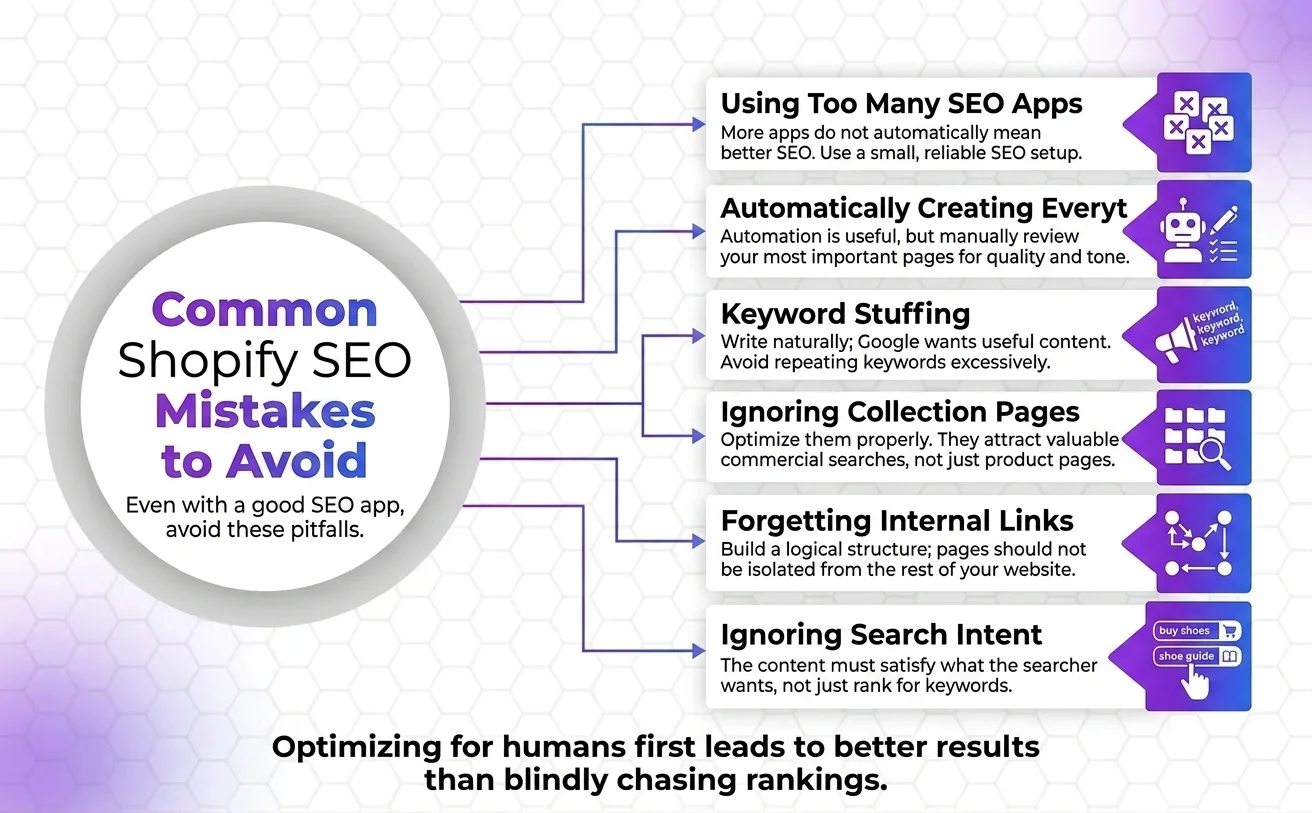
Even with a good SEO app, avoid these common mistakes.
Using Too Many SEO Apps
More apps do not automatically mean better SEO.
Use a small, reliable SEO setup.
Automatically Creating Everything
Automation is useful.
But automatically generated titles and descriptions may sound repetitive or unnatural.
Review your most important pages manually.
Keyword Stuffing
Do not repeat your target keyword in every sentence.
Google wants useful content that satisfies the searcher’s needs.
Write naturally.
Ignoring Collection Pages
Many Shopify stores focus only on product pages.
Collection pages can also attract valuable commercial searches.
Optimize them properly.
Forgetting Internal Links
A page should not be isolated from the rest of your website.
Build a logical internal linking structure.
Ignoring Search Intent
Ranking for a keyword is not enough.
The page must satisfy what the searcher wants.
Someone searching “buy men’s running shoes” has a different intent from someone searching “how to choose running shoes.”
Your content should match that intent.
FAQs
What is the best SEO app for Shopify?
The best Shopify SEO app depends on your needs. Smart SEO is useful for automation, TinyIMG is strong for image optimization, SEO Manager offers more control, Plug In SEO helps identify SEO problems, and Avada provides a broad set of SEO tools.
Do I need an SEO app for Shopify?
No, you do not always need an SEO app. Shopify provides several built-in SEO features. However, an SEO app can make tasks such as image optimization, metadata management, redirects, audits, and structured data easier.
Can Shopify SEO apps improve Google rankings?
SEO apps can help you fix and optimize parts of your website, but they do not guarantee rankings. Rankings depend on many factors, including content quality, relevance, technical SEO, authority, competition, and user experience.
Are Shopify SEO apps free?
Some Shopify SEO apps offer free plans or limited free features. Others use monthly pricing or paid plans. Always check the app’s current Shopify App Store pricing before choosing one.
Can I use more than one Shopify SEO app?
You can, but be careful. Multiple apps may perform the same tasks and create conflicts. In particular, check whether more than one app is adding schema, editing metadata, or optimizing the same elements.
What SEO app is best for Shopify product pages?
Choose an app that helps you manage product metadata, image alt text, structured data, and other on-page SEO elements. However, the quality of your product content and overall SEO strategy still matters more than the app itself.
Conclusion
The best SEO app for Shopify is the one that matches your store’s current needs.
Choose:
- Smart SEO if you want simple SEO automation.
- TinyIMG if image optimization is a priority.
- SEO Manager if you want greater SEO control.
- Plug In SEO if you need help finding SEO problems.
- Avada SEO if you want a wider range of SEO features in one app.
Before installing anything, audit your Shopify store first.
Want to improve your Shopify store’s organic visibility? Start with a complete SEO audit, fix the highest-impact issues, and then use the right SEO tools to support your strategy.