


Migrating from Magento to Shopify involves transferring your products, customers, orders, content, and SEO assets from a Magento store to a Shopify store. The process typically includes auditing your existing store, exporting data, importing it into Shopify, configuring your new store, setting up redirects, and testing functionality before launch.
Shopify has evolved into something genuinely remarkable for e-commerce businesses of all sizes. Brands like Gymshark, Tesla Motors, and Red Bull run on it. It’s fast, fully hosted, and doesn’t require a developer just to update a banner.
When planned correctly, a Magento to Shopify migration can improve store management, reduce maintenance costs, and preserve existing search engine rankings.
This guide walks through the Magento to Shopify migration process step by step, including how to move your data, avoid common migration mistakes, and protect your SEO performance during the transition.
What Is Magento & Shopify?
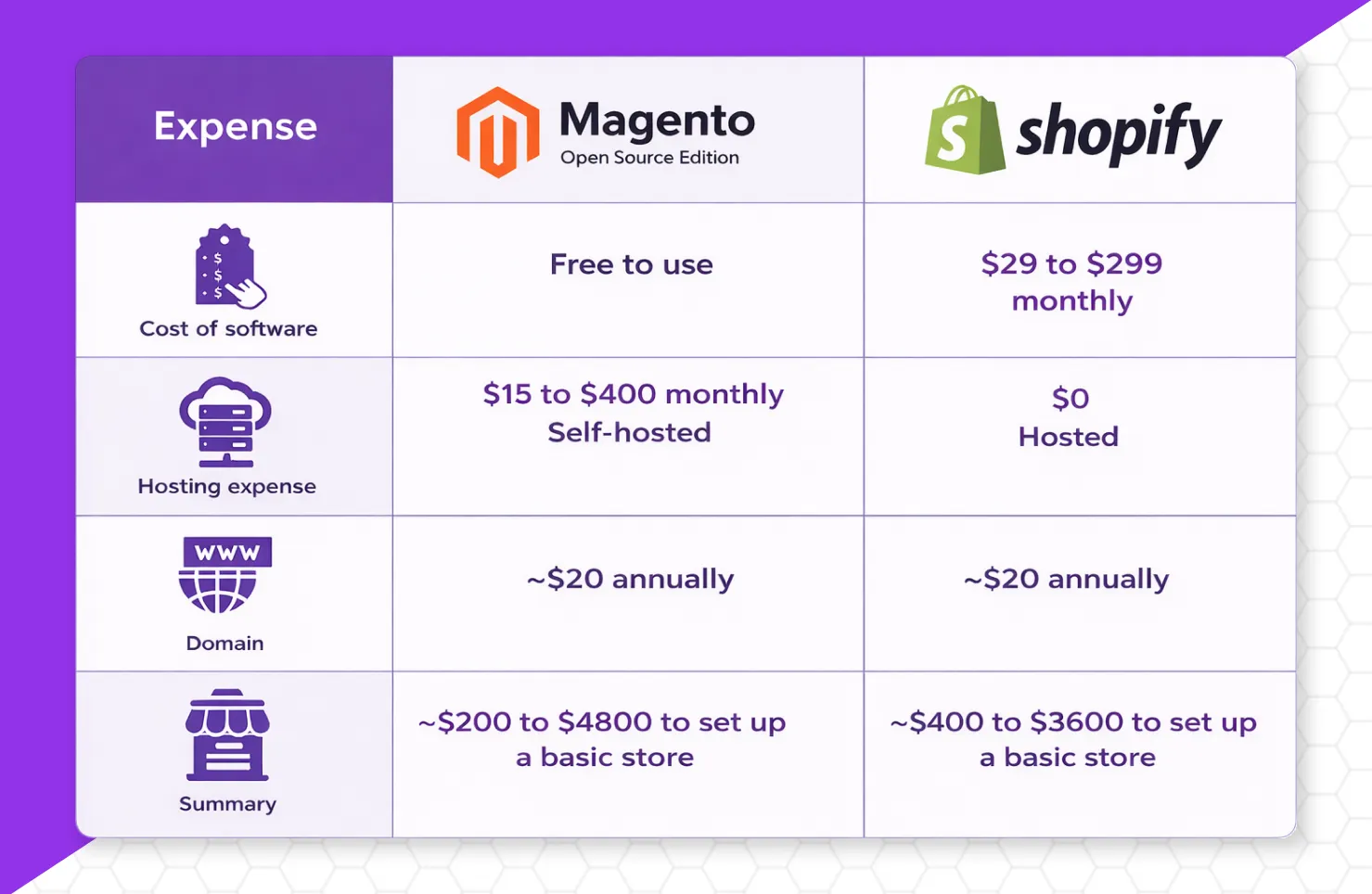
Magento and Shopify are two popular ecommerce platforms, but they serve different needs. Magento is an open-source platform that offers extensive customization and complete control over your online store. Shopify is a hosted ecommerce platform that manages hosting, security, updates, and performance for you.
Magento is ideal for businesses with complex requirements, such as large product catalogs, custom pricing rules, and advanced B2B workflows. However, it requires ongoing technical management, including hosting, maintenance, and security updates.
Shopify simplifies ecommerce management by handling the technical side of running a store. This allows businesses to focus on marketing, customer acquisition, and growth rather than platform maintenance.
Why Migrate from Magento to Shopify?
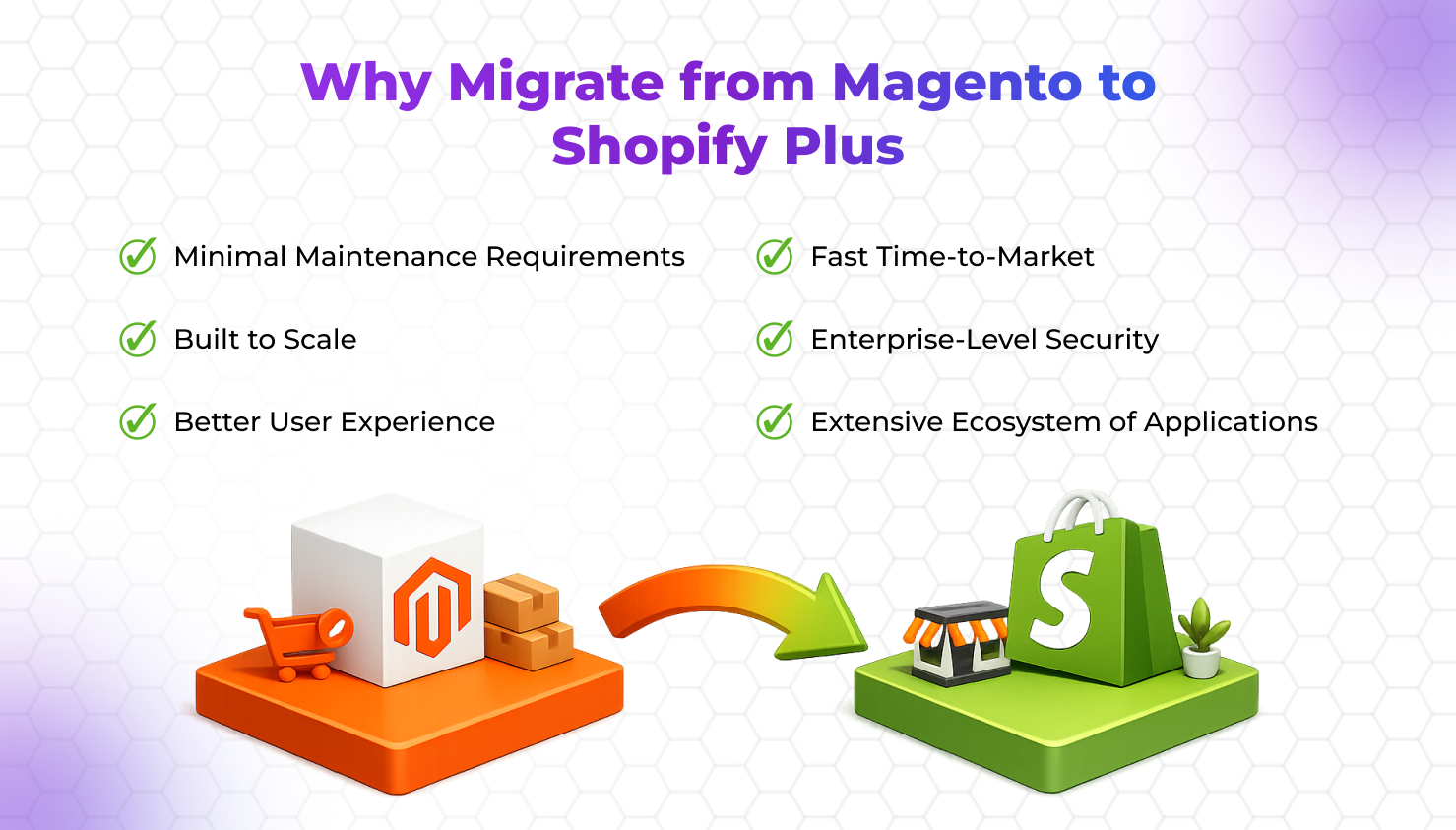
While Magento remains a capable platform, many businesses migrate because they want a solution that requires less technical management.
Common reasons include:
- High development and maintenance costs
- Dependence on developers for routine updates
- Security and hosting responsibilities
- Complex backend management
- Slow implementation of new features
- Difficulty scaling operations efficiently
Shopify removes much of this complexity by providing hosting, security, maintenance, and platform updates as part of its ecosystem.
Who Should Consider Migration From Magento to Shopify ?
Magento to Shopify migration may be a good option for:
- Growing ecommerce brands
- Multi-product online stores
- Direct-to-consumer businesses
- Retail brands expanding online
- Businesses looking to reduce operational overhead
- Merchants seeking a more user-friendly platform
What Data Can Be Migrated From Magento to Shopify ?
Most ecommerce stores can transfer a significant portion of their existing data.
This typically includes:
- Products
- Product variants
- Customers
- Orders
- Categories
- Images
- Blog posts
- Reviews
- Coupon data
- SEO metadata
The exact scope depends on your Magento configuration and any custom functionality currently in use.
Magento to Shopify Migration Checklist
Preparation plays a major role in migration success.
Before transferring any data, create a migration plan that outlines every critical component of your store.
Audit Your Existing Store
Start by reviewing your current Magento store.
Document:
- Product inventory
- Customer records
- Orders
- Blog content
- Landing pages
- Existing integrations
- SEO assets
This helps identify what should be migrated, updated, consolidated, or removed.
Back Up All Data
Always create a complete backup before beginning migration.
Your backup should include:
- Store database
- Product files
- Customer information
- Images
- Website content
Having a backup provides protection if unexpected issues occur during migration.
Review Current SEO Assets
SEO preservation begins before migration starts.
Record important SEO information including:
- Top-performing pages
- Organic traffic sources
- Indexed URLs
- Meta titles
- Meta descriptions
- Backlink destinations
- Keyword rankings
This information becomes valuable when implementing redirects and monitoring post-migration performance.
Identify Essential Integrations
Most ecommerce businesses rely on multiple third-party systems.
Review all active integrations, including:
- Payment gateways
- CRM platforms
- Inventory management tools
- Email marketing systems
- Customer support software
- Analytics platforms
Not every Magento extension will have a direct Shopify equivalent, so identifying alternatives early prevents delays later.
Document Existing URL Structure
One of the most important migration tasks involves preserving URL equity.
Create a complete inventory of:
- Product URLs
- Category URLs
- Blog URLs
- Landing pages
This URL map will be used when implementing 301 redirects after migration.
Define a Migration Timeline
Migration projects should follow a clear timeline.
Your timeline should include:
- Data export
- Data import
- Store configuration
- Design implementation
- SEO setup
- Quality assurance testing
- Launch preparation
Businesses with larger catalogs or custom functionality should allocate additional time for testing and troubleshooting.
How to Migrate from Magento to Shopify
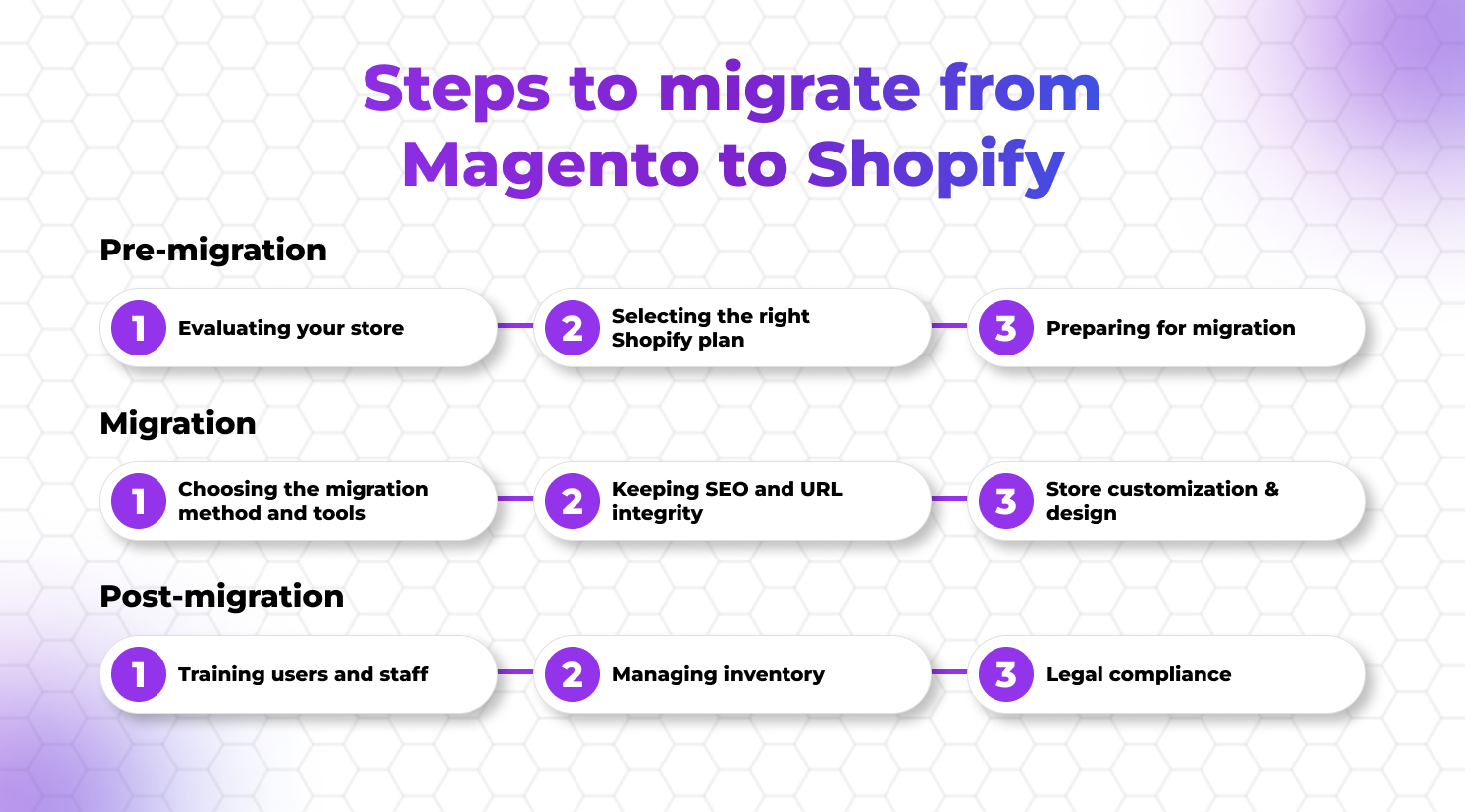
Step 1: Create Your Shopify Store
Start by setting up your Shopify account.
Configure:
- Business information
- Tax settings
- Shipping zones
- Payment gateways
- Currency preferences
Avoid rushing into design changes at this stage. Focus first on building a stable migration environment.
Step 2: Export Data from Magento
Export all required store data.
This usually includes:
- Product catalogs
- Customer records
- Orders
- Categories
- Blog content
Most stores export this information in CSV format.
Before moving forward, review exported files to ensure data accuracy and completeness.
Step 3: Import Data into Shopify
Import your data using:
- Shopify’s native tools
- Migration applications
- Custom migration solutions
After importing, carefully verify:
- Product information
- Variants
- Pricing
- Images
- Customer records
Even small data inconsistencies can create issues after launch.
Step 4: Organize Collections and Navigation
Magento categories often need restructuring when moving to Shopify.
Create:
- Product collections
- Navigation menus
- Filter systems
- Search functionality
The objective is to make products easier for customers to discover and purchase.
Step 5: Install Essential Shopify Apps
Most stores require additional functionality after migration.
Common app categories include:
- Product reviews
- SEO optimization
- Email marketing
- Customer support
- Inventory management
- Analytics
Stores with custom functionality often benefit from professional Shopify Development Services to ensure apps, integrations, and workflows align with business requirements.
This is what we handle for clients whose stores are too valuable to risk on a partially automated process.
How to Preserve SEO During Magento to Shopify Migration
One of the biggest concerns during any migration is maintaining organic search visibility.
Businesses that rely heavily on organic traffic often invest in dedicated Shopify SEO Services to protect rankings and maintain search visibility throughout the migration process.
Create 301 Redirects
301 redirects tell search engines that a page has permanently moved.
Redirect:
- Product URLs
- Category URLs
- Blog URLs
- Landing pages
Missing redirects are one of the most common causes of traffic loss after migration.
Preserve Meta Titles and Descriptions
Transfer important SEO metadata whenever possible.
This helps maintain relevance and continuity for search engines.
Maintain Internal Links
Review all navigation menus, content links, and footer links after migration.
Broken internal links create poor user experiences and weaken SEO performance.
Submit an Updated XML Sitemap
After launch:
- Generate a new sitemap
- Submit it through Google Search Console
- Request indexing of key pages
This helps search engines discover your new structure more quickly.
Monitor Performance Closely
Track:
- Organic traffic
- Keyword rankings
- Crawl errors
- Indexing status
Minor fluctuations are common, but significant declines should be investigated immediately.
Most migration-related SEO losses occur because redirects, URL mapping, and indexing checks are overlooked.
Common Magento to Shopify Migration Challenges
Data Mapping Issues
Different platforms organize information differently.
Products, categories, and custom attributes may require manual adjustments.
URL Structure Changes
Magento and Shopify often generate different URL formats.
Without proper redirects, ranking losses can occur.
App Compatibility
Not every Magento extension has a direct Shopify equivalent.
Evaluate alternatives before migration begins.
Custom Functionality
Stores with highly customized Magento environments may require custom Shopify development to recreate certain features.
Businesses with complex integrations or enterprise-level requirements often work with experienced Shopify migration specialists to ensure data accuracy and maintain business continuity throughout the migration process.
How Long Does Magento to Shopify Migration Take?
Magento to Shopify migration typically takes anywhere from a few days to several weeks depending on store size, custom functionality, and data complexity. Small stores can often migrate within days, while enterprise stores may require months of planning and testing.
Small Stores
Typically completed within a few days.
Medium-Sized Stores
Often require several weeks.
Enterprise Stores
Large stores with custom integrations and extensive catalogs may require several months of planning, migration, testing, and optimization.
Magento to Shopify Migration Cost
Migration costs depend on several factors.
DIY Migration
Lowest upfront cost but requires significant time and technical knowledge.
Migration Tools
Many migration applications charge based on store size and data volume.
Professional Migration Services
Costs vary depending on:
- Number of products
- Store complexity
- Design requirements
- Custom development needs
- SEO preservation requirements
The more customized your Magento environment, the more detailed the migration process becomes.
When Should You Hire a Shopify Migration Agency?
While some small stores can handle migration internally, larger ecommerce businesses often benefit from professional migration support. Magento stores with custom functionality, complex integrations, large product catalogs, or significant organic traffic require careful planning to avoid data loss and SEO issues.
You should consider working with a migration specialist if your store has:
- Thousands of products and categories
- Custom Magento extensions or integrations
- High organic search traffic
- International customers and multiple storefronts
- Complex checkout or inventory workflows
- Revenue-sensitive operations where downtime must be minimized
Companies with complex ecommerce requirements often partner with a Shopify Services Provider to manage migration planning, SEO preservation, and post-launch optimization.
Best Practices for a Successful Magento to Shopify Migration
- Plan before making changes
- Create complete backups
- Document existing URLs
- Test every feature before launch
- Implement redirects correctly
- Verify tracking and analytics
- Monitor rankings after launch
- Train your team on Shopify workflows
A successful migration is not measured by how quickly data is transferred. It is measured by how effectively the new store performs after launch.
FAQs
Can I migrate Magento to Shopify without losing SEO?
Yes. Proper 301 redirects, URL mapping, metadata preservation, and post-migration monitoring can significantly reduce SEO risks.
What data can be migrated from Magento to Shopify?
Products, customers, orders, images, reviews, blog content, and SEO metadata can usually be transferred.
How much does Magento to Shopify migration cost?
Costs vary based on store size, custom functionality, integrations, and migration requirements.
How long does migration take?
Small stores may take days, while enterprise-level migrations can take several weeks or months.
Will my website experience downtime?
Most migrations can be planned to minimize downtime and customer disruption.
Need Help Migrating from Magento to Shopify?
Planning a Magento to Shopify migration? The right migration strategy helps protect your SEO rankings, customer data, product information, and store functionality throughout the transition.
Working with an experienced Shopify Migration Specialists can simplify the process, minimize risks, and ensure your new Shopify store is ready for growth from day one.
Conclusion
Magento to Shopify migration is the process of moving an ecommerce store from Magento to Shopify while preserving products, customer data, order history, and SEO performance. For most growing ecommerce businesses, Shopify offers a simpler, more scalable solution with built-in hosting, security, automatic updates, and a user-friendly management system.
Businesses often use migration projects as an opportunity for Improving ecommerce Performance and User Experience across their entire store.
The success of a migration depends on proper planning, accurate data transfer, SEO preservation, 301 redirects, and post-launch testing. Businesses that follow a structured migration process can minimize risk, maintain search visibility, and improve overall store performance.